
Every growing BI team eventually asks the same question: “How do we give executives, managers, and department leads one clean place to open their reports without exposing our messy back-end workspaces?”
When comparing a Power BI workspace vs. app, Microsoft's intended roles are clear until your organization scales past a single workspace. Here is what each layer is actually built for, why native apps break down in real-world deployments, and how to fix the end-user experience without duplicating reports.
| Option | Who it is built for | Cross-workspace scope | Where it fails end users |
|---|---|---|---|
| Power BI Workspace | Report creators, BI developers, and data engineers | Single workspace container | Exposes raw semantic models, staging items, and technical naming to business viewers. |
| Workspace App (+ Audiences) | End users viewing content from one department workspace | 1 Workspace → 1 App only | Cannot pull reports from other workspaces; capped at 10 audience groups; manual republishing. |
| Microsoft Fabric Org Apps | Teams splitting one large workspace into multiple apps | 1 Workspace → Multiple Apps | Solves the inverse problem. Still cannot combine reports from multiple workspaces into one app, and requires Fabric capacity. |
| LumioBI Portal | All business report viewers across the entire organization | Many Workspaces → 1 Unified Menu | Requires the LumioBI browser extension alongside native Power BI. |
1. Power BI Workspaces: Built for creators, not business viewers
A Power BI Workspace (or Microsoft Fabric Workspace) is a development and governance container. It is the kitchen where your data team prepares analytics, not the dining room where executives should eat.
Inside a typical workspace, creators manage:
- Semantic models (datasets) and dataflows that power multiple reports.
- Fabric engineering artifacts such as lakehouses, notebooks, data pipelines, and SQL endpoints.
- Work-in-progress reports, QA test copies, and staging versions.
- Security and deployment boundaries (Dev, Test, and Prod workspaces organized by data domain or engineering team).
When organizations give business users the Viewer role directly on workspaces as their primary navigation method, adoption suffers immediately. Users have to remember cryptic workspace names (like FIN_Analytics_Prod_WS), scroll past semantic models they cannot open, and guess which report is the approved version.
2. Power BI Workspace Apps & Audiences: Built for end users, but fails outside one silo
To shield business users from raw workspaces, Microsoft created Power BI Workspace Apps. An administrator selects finished reports from a workspace, arranges a left-hand navigation menu, configures multiple audiences for Power BI apps to hide or show tabs by group, and publishes a consumption link.
If your entire company only ever uses one workspace, a Workspace App works fine. In almost every real organization, however, native Power BI Apps fail on four fronts:
Failure #1: The strict 1-Workspace boundary
A Power BI Workspace App can only package reports that live inside that single workspace. If a regional VP needs the Revenue report from the Finance Workspace, the Pipeline report from the Sales Workspace, and the Staffing report from the Operations Workspace, you cannot bundle those three reports into one native App. Your VP is forced to jump in and out of three separate Apps.
Failure #2: Power BI App Audiences are capped at 10
Many teams try to work around the single-workspace limit by dumping every department's reports into one giant workspace and using Power BI App Audiencesto control who sees what. Then they hit Microsoft's hard ceiling: a Workspace App only allows a maximum of 10 audience groups. The moment you have 11 functional teams, regions, or client tiers, App Audiences hits a brick wall.
Failure #3: Shallow hierarchy & manual “Update App” friction
Workspace App navigation only supports a shallow section list rather than a true multi-level business folder tree. Furthermore, report updates or navigation tweaks require an administrator to manually republish via Update App, and external URL links added to an app often open in jarring new browser tabs or fail when users lack separate target permissions.
3. Microsoft Fabric Org Apps: Solving the wrong direction
When Microsoft announced Microsoft Fabric Org Apps (Organizational Apps) as a standalone workspace item type, BI teams hoped it would finally let them build one unified portal pulling reports from multiple workspaces.
It does the exact opposite.
- Wrong direction (1-to-Many instead of Many-to-1): Classic Workspace Apps enforced a
1 Workspace = 1 Apprule. Fabric Org Apps changed that to1 Workspace = Many Org Apps. An Org App still only pulls included items from the single workspace where it lives. It does not aggregate reports across your Finance, Sales, and Operations workspaces. - More app sprawl for end users: Because teams can now create several Org Apps per workspace, business users end up with even more disconnected apps to search through and bookmark, with no unified navigation bar connecting them.
- Requires Microsoft Fabric / Premium capacity: Org Apps are a Fabric item type that requires Fabric capacity (F-SKUs or P-SKUs). Organizations running on standard Power BI Pro shared capacity cannot use Org Apps at all.
- Missing item types & preview constraints: Traditional Power BI Dashboards and several legacy configuration patterns are not supported the same way inside Org Apps, forcing teams to maintain a confusing mix of classic Workspace Apps and Fabric Org Apps at the same time.
4. Why common multi-workspace workarounds create a maintenance mess
If you search Reddit's r/PowerBI or the Microsoft Fabric Community forums for “combine reports from multiple workspaces into one app,” you will see four common workarounds, and each one carries a steep hidden cost:
- Using “Save a copy” into a central Portal Workspace: Duplicating reports from department workspaces into a central workspace just to include them in one App breaks report lineage. When the original author updates the report in their workspace, the copy in the App goes stale unless someone manually re-copies it.
- Stuffing the entire company into one giant Workspace: Abandoning separate workspaces destroys security boundaries between development teams and quickly collides with the 10-audience limit in Power BI Apps.
- Adding Web URL links inside an App: Adding external report URLs to an App menu kicks users out of the current App shell into separate tabs, and quietly piles up background items until Power BI throws the “Only 20 items can be opened at one time” error.
- Building custom Power BI Embedded web applications: Writing a custom React/ASP.NET portal using Power BI Embedded requires dedicated software engineers and an expensive Fabric / Embedded capacity commitment. (See our full breakdown of Org Apps vs. Embedded Analytics vs. LumioBI.)
5. How LumioBI delivers what Power BI Apps were supposed to be
Instead of fighting Power BI's workspace architecture, LumioBI separates where reports are stored from how business users navigate them.
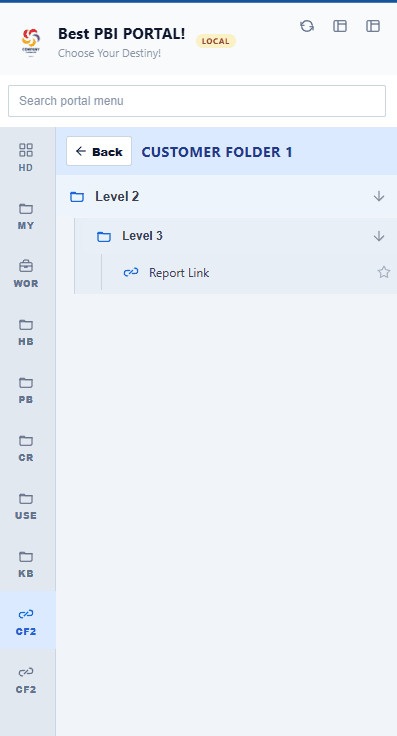
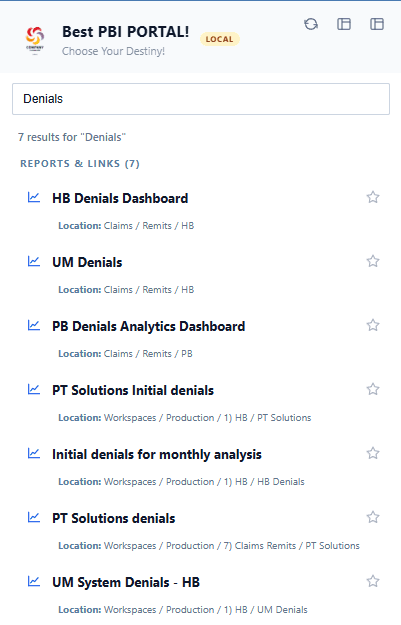
Your data teams keep their clean, governed workspaces (Finance, Sales, Operations, HR). Meanwhile, the LumioBI browser extension places a persistent, branded portal sidebar directly alongside native app.powerbi.com:
Why BI teams use LumioBI instead of wrestling with Apps & Org Apps
- Combine reports, dashboards, apps, and external documentation (SharePoint, Teams, data dictionaries) from any workspace into one sidebar menu.
- Target folders, links, and scheduled ETL outage alerts to unlimited user groups, with no 10-audience ceiling.
- Publish navigation changes in seconds from the LumioBI admin console without republishing Power BI apps.
- Keep 100% of your data inside Microsoft: LumioBI never stores report data or PHI, and Microsoft Entra + Power BI continue enforcing every report and RLS permission.
- Automatically clean up inactive Fabric session tabs in the background so users never hit the 20-open-item error.
Want to plan your folder structure before building your portal? See our Power BI landing page for multiple reports guide and download the free CSV planner in our Power BI report catalog guide.
Common questions
Should end users ever be given access directly to a Power BI Workspace?
Only when they are collaborating as report authors, testers, or builders. Giving everyday business viewers direct workspace access exposes semantic models, staging reports, and technical workspace names that confuse non-technical consumers.
Can a Fabric Org App pull reports from two different workspaces?
No. Like classic Workspace Apps, a Microsoft Fabric Org App only packages content from the single workspace where the Org App item is created. Its main addition is allowing multiple Org Apps inside one workspace, not combining multiple workspaces into one app.
Does LumioBI replace Power BI permissions or Microsoft licensing?
No. LumioBI organizes navigation and visibility on top of native Power BI. Viewers still sign in to app.powerbi.com with their existing Microsoft license (Pro, PPU, or Fabric capacity), and Power BI continues to enforce all workspace, report, and Row-Level Security (RLS) permissions.
One menu across every workspace
Stop forcing users to jump between disconnected Power BI Apps.
Keep your workspaces organized for your creators, and use LumioBI to give business viewers one unified, searchable navigation menu across all of Power BI.
Written by LumioBI, the product described in this guide. Microsoft Power BI and Fabric features can change; consult Microsoft's official documentation for current workspace and app specifications.